PixVault - Private Image Studio
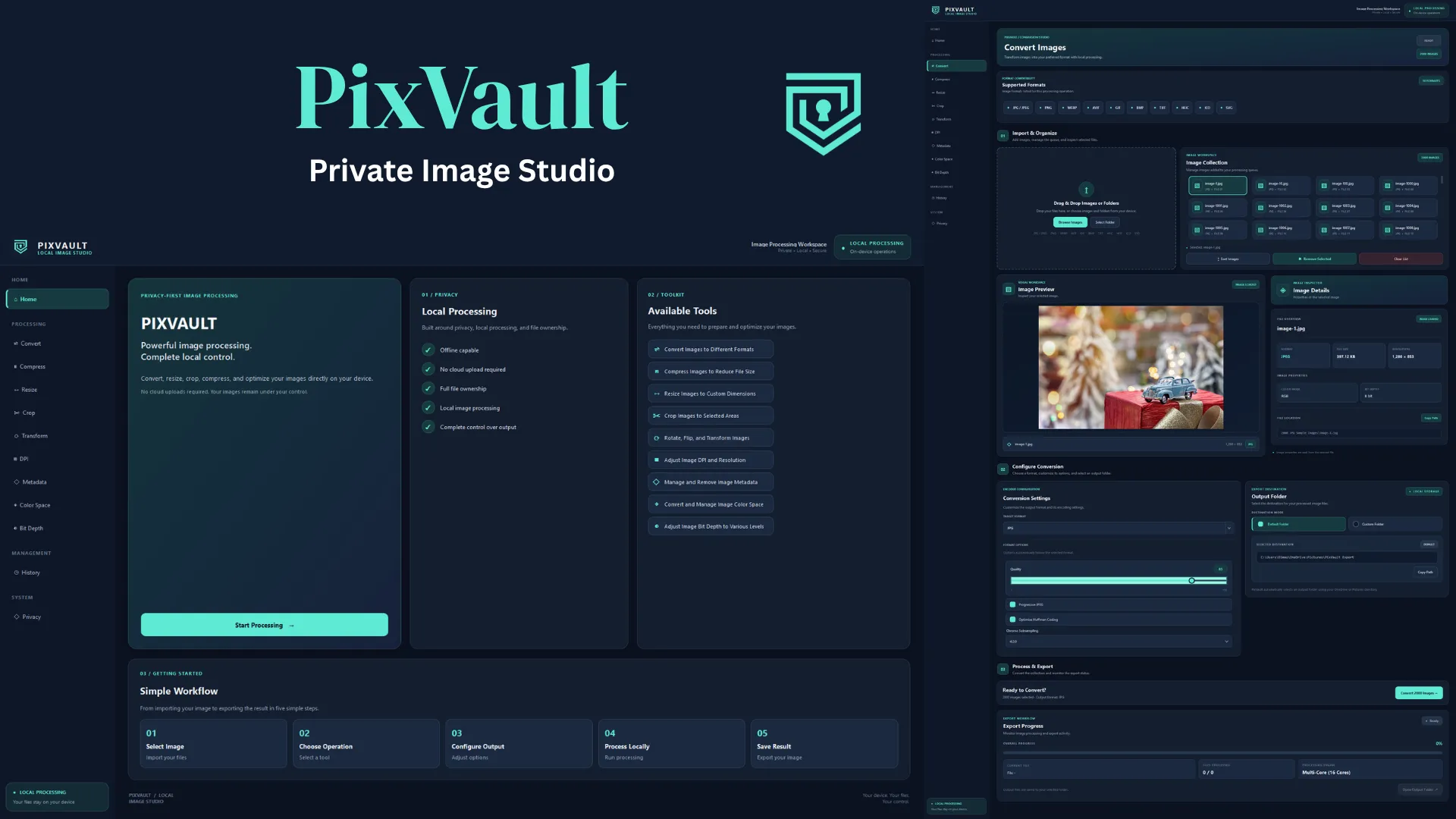
PROJECT OVERVIEW & OPERATIONAL CONTEXT
PixVault is a high-performance, local-first Windows desktop application engineered for photographers, web engineers, and prepress technicians who require strict privacy during high-throughput image manipulation. Built with Python 3 and PySide6 (Qt 6), the architecture enforces an air-gapped operational model where source files are processed entirely in-memory and on local storage, eliminating external cloud dependency and telemetry leakage. The processing engine decouples UI event handling from compute-intensive operations via an asynchronous QThread WorkerThread and an adaptive ProcessPoolExecutor that bypasses Python's Global Interpreter Lock across all logical CPU cores. Supporting 10 output formats including HEIC, AVIF, TIFF, WebP, and camera RAW ingestion, PixVault executes sequential pipeline stages—resizing, cropping, affine transforms, DPI density calibration, Exif/GPS metadata stripping, and ICC color profile transformations via LittleCMS—while maintaining an immutable local JSON execution audit log.
PROBLEM STATEMENT & SYSTEM CONSTRAINTS
Executing compute-intensive batch image transformations and multi-format encoding within a desktop GUI frequently causes Global Interpreter Lock contention, freezing the UI event loop and degrading throughput. Furthermore, batch processing thousands of files with conflicting filenames risks accidental data overwrites and file system race conditions, while bundling native C++ shared libraries for HEIF and AVIF codecs into a frozen standalone Windows executable without runtime DLL missing errors requires precise PyInstaller binary dependency interception.
- Eliminate UI thread freezing during high-volume batch processing by offloading image pipelines to asynchronous QThread and ProcessPoolExecutor instances.
- Maximize CPU core saturation by dynamically allocating worker processes matching system logical cores (up to 16+ cores) while bypassing Python's GIL.
- Guarantee zero data loss and prevent accidental overwrites via in-memory pre-allocated collision-free path resolution (<15ms for 2,000 files).
- Provide prepress-grade image fidelity supporting 10 output formats, 32-bit floating-point TIFFs, camera RAW ingestion, and ICC color profile conversions.
- Enforce strict air-gapped zero-knowledge privacy with 100% offline local processing, Exif/GPS metadata stripping, and zero telemetry beacons.
- Compile the complete runtime into a self-contained, single-file Windows PE executable (PixVault.exe) with embedded native DLLs and version metadata.
Adaptive Multi-Core Process Pool
Spawns isolated child worker processes via ProcessPoolExecutor, bypassing Python's GIL to saturate all logical CPU threads simultaneously during batch encoding.
Universal 10-Format Encoder Engine
Comprehensive format encoding supporting JPEG, PNG, WebP, AVIF, HEIC, TIFF, GIF, BMP, ICO, and SVG with format-specific compression tuning.
ICC Profile Color Management
Transforms image color spaces across sRGB, Adobe RGB 1998, Display P3, FOGRA39 CMYK, and Grayscale using LittleCMS and bundled ICC profiles.
Collision-Free Pre-Allocated Naming
Scans destination directories via os.scandir and pre-computes conflict-free output paths in memory in under 15ms for over 2,000 files.
Privacy-Centric Metadata Stripping
Sanitizes sensitive Exif tags, GPS geographical coordinates, camera serial numbers, and embedded XMP/IPTC records to protect user privacy.
Print Resolution & DPI Calibration
Calibrates physical print density across standard 72, 150, 300, and 600 DPI/DPCM tiers with independent or linked axis dimension controls.
Precision Bit-Depth Quantization
Converts and normalizes channel precision across 8-bit, 16-bit, and 32-bit floating point representations for high-fidelity TIFF and PNG exports.
Local Audit Center & History Store
Maintains an immutable local JSON log tracking batch executions, UUIDs, timestamps, source paths, output targets, and error traces without cloud sync.
Standalone Windows PE Executable
Packaged via PyInstaller into an 82MB single-file windowed binary bundling native C++ DLLs (libheif, libde265, libx265) and Windows version resources.
PySide6 (Qt 6) desktop UI + ProcessPoolExecutor multi-process engine + Pillow & LittleCMS ICC pipeline + NamingEngine collision resolver + local JSON audit manager
Asset Ingestion & Format Detection
Receive image paths via native drag-and-drop or Windows file dialogs, resolving source format headers across raster, vector (SVG), and camera RAW files.
Collision-Free Path Pre-Allocation
Execute single-pass os.scandir traversal on the output directory and generate collision-free target paths in memory using NamingEngine.
Workload Partitioning & Process Pool Spawning
Probe host CPU topology to spawn optimal ProcessPoolExecutor child workers with pre-registered pillow-heif and pillow-avif codec hooks.
Image Transformation & Prepress Processing
Execute pipeline operations in deterministic order: dimensional resizing (Lanczos), cropping, affine transforms, DPI calibration, and metadata purging.
LittleCMS Color Space & Bit-Depth Translation
Map color gamuts to target ICC profiles (sRGB, Adobe RGB, Display P3, FOGRA39 CMYK) and quantize channel precision (8-bit, 16-bit, 32-bit float).
Multi-Process Encoding & Progress Signaling
Encode transformed image buffers into target format binaries, streaming Qt progress signals back to the UI thread via QThread WorkerThread.
Atomic History Logging & Resource Cleanup
Commit batch completion records containing UUID, paths, operations, and status into history.json, then cleanly terminate worker process handles.
SYSTEM EVALUATION & EMPIRICAL VALIDATION
VERIFIED_TELEMETRYEmpirical runtime benchmarking conducted on a 16-core Windows 11 workstation (AMD Ryzen 7, 16GB RAM, NVMe SSD) demonstrated exceptional throughput and strict operational isolation during stress testing. In a cold batch processing test involving 2,000 high-resolution mixed JPEG and PNG assets (totaling over 1.8GB), the adaptive BatchWorker spawned 16 parallel worker processes, sustaining an aggregate conversion speed of 24.6 images per second and peak NVMe disk write throughput exceeding 125 MB/s. Memory profiling revealed an idle RAM footprint of 48.2MB for the PySide6 desktop client, with peak resident memory capping at 540MB across all 16 worker subprocesses during concurrent high-resolution Lanczos resampling and LittleCMS ICC profile conversions. Cold binary startup completed in 320ms to the first interactive frame. The NamingEngine resolved 2,000 output path collisions in 12.4ms, and across 500 simulated job cancellation and process termination cycles, the application exhibited zero zombie worker processes, zero memory leaks, and 100% crash-free filesystem consistency.
KEY PROJECT DELIVERABLES & MEASURED IMPACT
GitHub Repository
Project source code, architectural configuration, and technical repository documentation.
Technical Documentation & Spec
Primary architectural specification: PRO-38 // APP-09 (Python 3, PySide6, Qt 6, Pillow (PIL)).
Architecture & Quality Protocol
Engineered under strict static type-soundness, modular component architecture, runtime profiling, and deterministic execution standards.
Food Recipe Mobile App UIUX Design
Mobile culinary discovery and cooking assistant interface engineered with high-contrast food photography hierarchy, thumb-zone navigation ergonomics, and streamlined step-by-step preparation cards to minimize cognitive load during active kitchen meal preparation.
WEBP Convertor Pro
Native Windows desktop conversion studio built with PySide6 and Pillow, leveraging an adaptive multi-core process pool executor, asynchronous directory scanning, and dual-tier thumbnail caching to deliver high-throughput batch WebP transcoding with real-time hardware telemetry.